The IOS XRv image is a virtual router that runs the IOS XR "classic" 32-bit OS. Cisco formerly licensed this VM as a virtual route reflector, but the IOS XRv image is now past its end-of-support date. We include IOS XRv in CML as a lightweight alternative to IOS XRv 9000 for simulating devices that run IOS XR.
IOS XRv is now deprecated, and no new versions of this image will be released. Older IOS XRv VM images are still available for use within CML, but IOS XRv is no longer included in the refplat ISO image. IOS XRv may be available on your CML instance if you migrated from an earlier version of CML or if you added the node and image definition yourself. See the CML software download page and then look for the IOS XRv images.
Note: This image is provided as-is. There is no support for this image from Cisco's Technical Advisory Center. For a supported reference platform that runs IOS XR, use IOS XRv 9000.
For more details about IOS XRv, refer to the following resources:
IOS XRv is performance limited when forwarding traffic. Achieved throughputs are ~1.35 Mbits/sec when passing traffic through one IOS XRv device, and ~1.22 Mbits/sec when chained over two IOS XRv devices. Baseline throughput was 612 Mbits/sec.
Point-to-point L2 MPLS VPN is not working properly on this XRv image. Control plane is working and VPN is successfully formed but the forwarding does not work.
IOS XRv has more limited feature coverage than IOS XRv 9000. This table shows the latest test results when testing the IOS XRv Feature Tests lab, running in CML:
| Test Name | Result |
|---|---|
| L3 MPLS VPN | PASS |
| L2 MPLS VPN | Not supported |
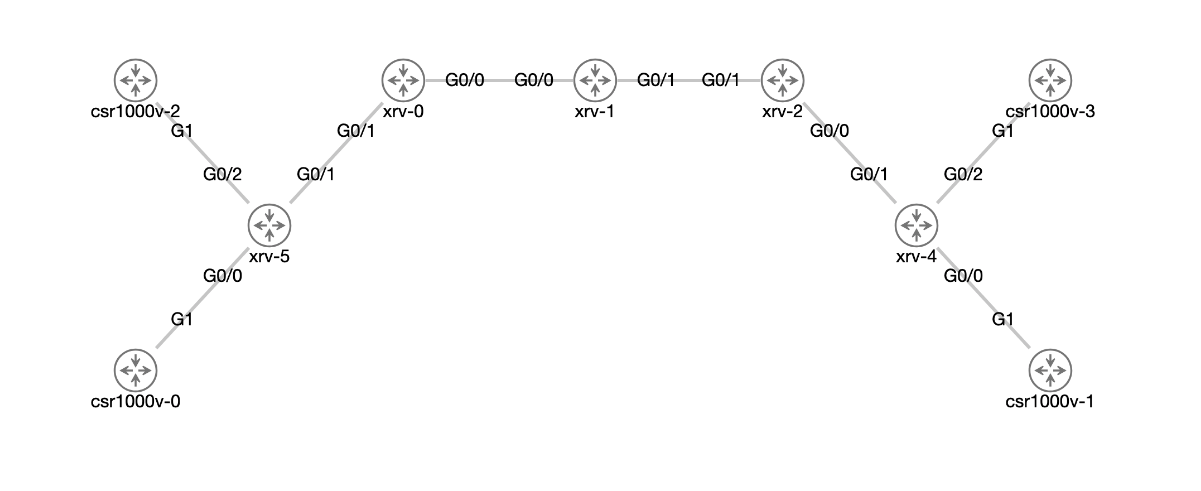
The test topology was
Specific IOS XRv tests:
RP/0/0/CPU0:iosxrv-4#sh ip route

C    10.12.0.0/24 is directly connected, 1d19h, GigabitEthernet0/0/0/1
L    10.12.0.1/32 is directly connected, 1d19h, GigabitEthernet0/0/0/1
i L1 10.23.0.0/24 [115/20] via 10.12.0.2, 1d19h, GigabitEthernet0/0/0/1
i L1 10.34.0.0/24 [115/30] via 10.12.0.2, 1d19h, GigabitEthernet0/0/0/1
i L1 10.45.0.0/24 [115/40] via 10.12.0.2, 1d19h, GigabitEthernet0/0/0/1
L    10.255.255.1/32 is directly connected, 1d20h, Loopback0
i L1 10.255.255.2/32 [115/20] via 10.12.0.2, 1d19h, GigabitEthernet0/0/0/1
i L1 10.255.255.3/32 [115/30] via 10.12.0.2, 1d19h, GigabitEthernet0/0/0/1
i L1 10.255.255.4/32 [115/40] via 10.12.0.2, 1d19h, GigabitEthernet0/0/0/1
i L1 10.255.255.5/32 [115/50] via 10.12.0.2, 1d19h, GigabitEthernet0/0/0/1
RP/0/0/CPU0:iosxrv-4#
traceroute from one PE to another shows that Label Switched Path is usedRP/0/0/CPU0:iosxrv-4#traceroute 10.255.255.5 source 10.255.255.1
Thu Nov 18 07:05:45.734 UTC
Type escape sequence to abort.
Tracing the route to 10.255.255.5
1 10.12.0.2 [MPLS: Label 16205 Exp 0] 9 msec 9 msec 19 msec
2 10.23.0.2 [MPLS: Label 16305 Exp 0] 9 msec 9 msec 0 msec
3 10.34.0.2 [MPLS: Label 16405 Exp 0] 9 msec 9 msec 9 msec
4 10.45.0.2 9 msec * 9 msec
RP/0/0/CPU0:iosxrv-4#show route vrf 101:Customer1

O    172.16.1.0/24 [110/2] via 172.16.101.2, 1d19h, GigabitEthernet0/0/0/2
C    172.16.101.0/30 is directly connected, 1d20h, GigabitEthernet0/0/0/2
L    172.16.101.1/32 is directly connected, 1d20h, GigabitEthernet0/0/0/2
RP/0/0/CPU0:iosxrv-4#show route vrf 101:Customer1

O    172.16.1.0/24 [110/2] via 172.16.101.2, 1d19h, GigabitEthernet0/0/0/2
C    172.16.101.0/30 is directly connected, 1d20h, GigabitEthernet0/0/0/2
L    172.16.101.1/32 is directly connected, 1d20h, GigabitEthernet0/0/0/2
B    192.168.1.0/24 [200/2] via 10.255.255.5 (nexthop in vrf default), 01:58:07
B    192.168.101.0/30 [200/0] via 10.255.255.5 (nexthop in vrf default), 01:58:07
RP/0/0/CPU0:iosxrv-4#
RP/0/0/CPU0:iosxrv-4#show l2vpn xconnect
Thu Nov 18 07:12:47.695 UTC
Legend: ST = State, UP = Up, DN = Down, AD = Admin Down, UR = Unresolved,
        SB = Standby, SR = Standby Ready, (PP) = Partially Programmed

XConnect                   Segment 1                       Segment 2
Group      Name       ST   Description            ST       Description            ST
------------------------   -----------------------------   -----------------------------
P2P        xconnect   UP   Gi0/0/0/0              UP       10.255.255.5    2      UP
----------------------------------------------------------------------------------------
csr1000v-0#ping 172.16.202.2
Type escape sequence to abort.
Sending 5, 100-byte ICMP Echos to 172.16.202.2, timeout is 2 seconds:
.....
Success rate is 0 percent (0/5)
csr1000v-0#