Genie LAMP
LAMP (Live Automation & Management Platform) is an interactive command-line interface built on top of pyATS/Genie that enables users to connect to network devices and perform operations interactively. Think of it as a REPL (Read-Eval-Print Loop) for network automation—where you can execute commands, parse outputs, run APIs, and configure devices in real-time, all while LAMP automatically records your session into reusable Blitz YAML automation scripts.
What LAMP Is
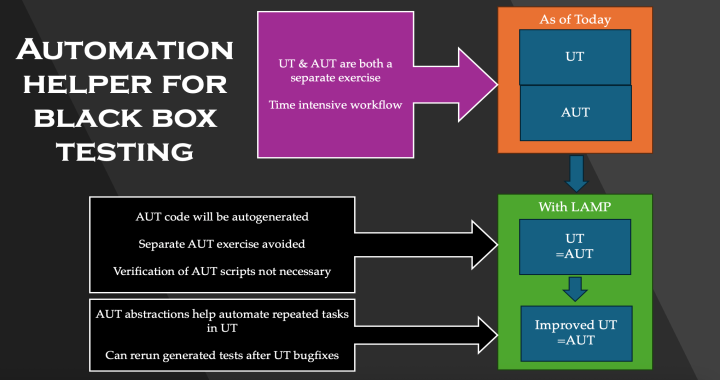
LAMP provides an interactive shell that bridges the gap between manual device interaction and automated testing. Instead of writing pyATS test scripts from scratch, you can work directly with your devices through LAMP’s intuitive command interface. Every action you perform is automatically captured and can be replayed later, making it easy to convert exploratory work into production-ready automation.
Core Commands
LAMP offers a comprehensive set of commands for device interaction:
execute - Run CLI commands on devices and capture output
parse - Execute commands and parse output into structured data using Genie parsers
configure - Apply configuration changes to devices
api - Execute Genie APIs for higher-level operations
bash_console - Interact with device bash/shell consoles
replay - Re-run previously recorded LAMP sessions (via Blitz YAML files)
sleep - Add delays between operations
Key Features
Interactive Shell Capabilities: Command history, autocompletion, and inline editing for a smooth user experience
Automatic Recording: Every operation is automatically saved as Blitz YAML, turning interactive sessions into reusable automation scripts
Replay Workflows: Use the
replaycommand to re-execute previously recorded sessions, enabling rapid iteration and higher-level workflow automationVariables and Loops: Support for parameterized commands, variables, and loops to work with multiple devices or configurations efficiently
Include/Exclude Filters: Powerful filtering options for command outputs to focus on specific data
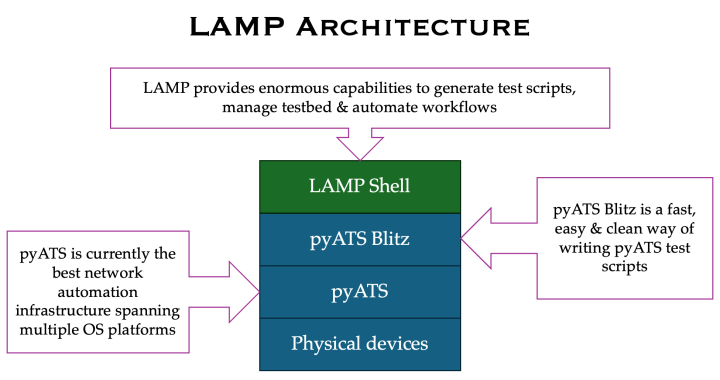
Architecture
Who Should Use LAMP
LAMP is designed for everyone involved in network automation:
Network Engineers: Quickly explore device configurations and troubleshoot issues interactively, then convert your investigation into automated tests
Test Automation Engineers: Develop and validate pyATS test scripts faster by prototyping in LAMP before formalizing into test suites
DevOps Teams: Build higher-level network workflows using LAMP’s replay capability to chain operations and create automation pipelines
Beginners to pyATS: Learn pyATS/Genie concepts interactively without needing to write Python code upfront
Usage Context
LAMP excels in scenarios where you need to:
Develop Automation Scripts: Interactively build and test device operations, then export them as Blitz YAML for use in your automation framework
Create Reusable Workflows: Record common operational sequences once, then replay them across different devices or environments
Prototype and Debug: Experiment with device commands and APIs in real-time to understand behavior before committing to automation scripts
Higher-Level Orchestration: Chain multiple LAMP sessions together using the
replaycommand to build complex, multi-step workflows
How It Works
LAMP leverages pyATS Blitz YAML as its foundation, recording each operation you perform on network devices. These recorded sessions become flexible, function-like building blocks that support parameters, variables, and conditional logic. You can modify the generated YAML files to add validations, error handling, or additional operations, then replay them as needed—making LAMP both a learning tool and a production-ready automation platform.