replay
The replay command executes LAMP-generated Blitz triggers
and automatically generates a pyATS Blitz ‘run_genie_sdk’ action
snippet.
Why replay
Network automation frequently requires repeating identical tasks across multiple devices or environments. The replay command enables reusable test scenarios to be captured in Blitz trigger files and executed multiple times with a single command.
This modular approach improves efficiency by:
Eliminating duplicate configuration steps
Enabling consistent test execution
Creating reusable automation components
Simplifying complex network workflows
The concept resembles functions in programming languages - define once, execute many times.
Basic usage
The replay command executes LAMP-generated Blitz triggers
from YAML files. The following example shows a Blitz trigger
that performs route verification on 2 devices:
# route_verify.yaml
# 27 August 2025
# LAMP Generated testcase
route_verify:
  source:
    pkg: genie.libs.sdk
    class: triggers.blitz.blitz.Blitz
  devices:
    - host1
  test_sections:
    - default:
        - execute:
            device: host1
            command: show ip route
            include:
              - 1.1.1.1
        - execute:
            device: host2
            command: show ip route
            include:
              - 1.1.1.1
This trigger can be auto-generated from LAMP and then used within other triggers as a sub-verification step. This approach avoids manually verifying the same thing across multiple trigger testcases.
To execute the trigger, use the replay command with
the YAML file as an argument:
(lamp-host1) replay route_verify.yaml
The command executes each action in sequence and displays detailed output showing the progress and results of each step.
(lamp-host2) replay route_verify.yaml
2025-09-23 09:14:42: %LAMP-INFO: +..............................................................................+
2025-09-23 09:14:42: %LAMP-INFO: :                       Starting action 'run_genie_sdk'                        :
2025-09-23 09:14:42: %LAMP-INFO: +..............................................................................+
                                                                route_verify: {}
2025-09-23 09:14:42: %LAMP-INFO: +..............................................................................+
2025-09-23 09:14:42: %LAMP-INFO: +..............................................................................+
2025-09-23 09:14:42: %LAMP-INFO: :                          Starting section 'default'                          :
2025-09-23 09:14:42: %LAMP-INFO: +..............................................................................+
2025-09-23 09:14:42: %LAMP-INFO: +..............................................................................+
2025-09-23 09:14:42: %LAMP-INFO: :                          Starting action 'execute'                           :
2025-09-23 09:14:42: %LAMP-INFO: +..............................................................................+
                                                              device: host1
                                                              command: show ip route
                                                              include:
                                                                - 1.1.1.1
2025-09-23 09:14:42: %LAMP-INFO: +..............................................................................+

2025-09-23 09:14:43,034: %UNICON-INFO: +++ host1 with via 'cli': executing command 'show ip route' +++
show ip route
Codes: L - local, C - connected, S - static, R - RIP, M - mobile, B - BGP
      D - EIGRP, EX - EIGRP external, O - OSPF, IA - OSPF inter area
      N1 - OSPF NSSA external type 1, N2 - OSPF NSSA external type 2
      E1 - OSPF external type 1, E2 - OSPF external type 2, m - OMP
      n - NAT, Ni - NAT inside, No - NAT outside, Nd - NAT DIA
      i - IS-IS, su - IS-IS summary, L1 - IS-IS level-1, L2 - IS-IS level-2
      ia - IS-IS inter area, * - candidate default, U - per-user static route
      H - NHRP, G - NHRP registered, g - NHRP registration summary
      o - ODR, P - periodic downloaded static route, l - LISP
      a - application route
      + - replicated route, % - next hop override, p - overrides from PfR
      & - replicated local route overrides by connected

Gateway of last resort is not set

      1.0.0.0/32 is subnetted, 1 subnets
O        1.1.1.1 [110/11] via 10.0.0.1, 00:00:43, Ethernet0/0
      10.0.0.0/8 is variably subnetted, 2 subnets, 2 masks
C        10.0.0.0/24 is directly connected, Ethernet0/0
L        10.0.0.2/32 is directly connected, Ethernet0/0
host1#
2025-09-23 09:14:43: %LAMP-INFO: +..............................................................................+
2025-09-23 09:14:43: %LAMP-INFO: :                          Validating INCLUDE Entries                          :
2025-09-23 09:14:43: %LAMP-INFO: +..............................................................................+
2025-09-23 09:14:43: %LAMP-INFO: :                               1.1.1.1 matches                                :
2025-09-23 09:14:43: %LAMP-INFO: +..............................................................................+
2025-09-23 09:14:43: %LAMP-INFO: +..............................................................................+
2025-09-23 09:14:43: %LAMP-INFO: :                          Starting action 'execute'                           :
2025-09-23 09:14:43: %LAMP-INFO: +..............................................................................+
                                                              device: host2
                                                              command: show ip route
                                                              include:
                                                                - 1.1.1.1
2025-09-23 09:14:43: %LAMP-INFO: +..............................................................................+

2025-09-23 09:14:43,254: %UNICON-INFO: +++ host2 with via 'cli': executing command 'show ip route' +++
show ip route
Codes: L - local, C - connected, S - static, R - RIP, M - mobile, B - BGP
      D - EIGRP, EX - EIGRP external, O - OSPF, IA - OSPF inter area
      N1 - OSPF NSSA external type 1, N2 - OSPF NSSA external type 2
      E1 - OSPF external type 1, E2 - OSPF external type 2, m - OMP
      n - NAT, Ni - NAT inside, No - NAT outside, Nd - NAT DIA
      i - IS-IS, su - IS-IS summary, L1 - IS-IS level-1, L2 - IS-IS level-2
      ia - IS-IS inter area, * - candidate default, U - per-user static route
      H - NHRP, G - NHRP registered, g - NHRP registration summary
      o - ODR, P - periodic downloaded static route, l - LISP
      a - application route
      + - replicated route, % - next hop override, p - overrides from PfR
      & - replicated local route overrides by connected

Gateway of last resort is not set

      1.0.0.0/8 is variably subnetted, 2 subnets, 2 masks
C        1.1.1.0/24 is directly connected, Loopback0
L        1.1.1.1/32 is directly connected, Loopback0
      10.0.0.0/8 is variably subnetted, 2 subnets, 2 masks
C        10.0.0.0/24 is directly connected, Ethernet0/0
L        10.0.0.1/32 is directly connected, Ethernet0/0
host2#
2025-09-23 09:14:43: %LAMP-INFO: +..............................................................................+
2025-09-23 09:14:43: %LAMP-INFO: :                          Validating INCLUDE Entries                          :
2025-09-23 09:14:43: %LAMP-INFO: +..............................................................................+
2025-09-23 09:14:43: %LAMP-INFO: :                               1.1.1.1 matches                                :
2025-09-23 09:14:43: %LAMP-INFO: +..............................................................................+
2025-09-23 09:14:43: %LAMP-INFO: +..............................................................................+
2025-09-23 09:14:43: %LAMP-INFO: :                                Replay results                                :
2025-09-23 09:14:43: %LAMP-INFO: +..............................................................................+
RESULT-TREE
└── run_genie_sdk
2025-09-23 09:14:43: %LAMP-INFO: +..............................................................................+
2025-09-23 09:14:43: %LAMP-INFO: +..............................................................................+
2025-09-23 09:14:43: %LAMP-INFO: :                                Replay PASSED                                 :
2025-09-23 09:14:43: %LAMP-INFO: +..............................................................................+
(lamp-host2)
The Blitz ‘run_genie_sdk’ action snippet is automatically generated by LAMP after the execution as shown below:
(lamp-host1) list 1
 - run_genie_sdk:
     route_verify:
       devices:
         - host1
(lamp-host1)
Extended triggers
When saving a trigger that consists of other replayed
triggers, all trigger file paths executed via replay
command are automatically added to the Blitz ‘extends’
field. This creates a dependency chain that ensures all
required triggers are available when the saved trigger
executes.
For example, if the ‘route_verify’ trigger is replayed for a trigger such as ‘interface_flap’ as shown below, the ‘extends’ field of the ‘interface_flap’ trigger will contain the file path to the ‘route_verify’ trigger:
# interface_flap.yaml
# 27 August 2025
# LAMP Generated testcase
extends:
  - route_verify.yaml
interface_flap:
  source:
    pkg: genie.libs.sdk
    class: triggers.blitz.blitz.Blitz
  devices:
    - host1
  test_sections:
    - default:
        - execute:
            device: host1
            command:
              - interface Ethernet0/0
              - shutdown
              - no shutdown
        - sleep:
            sleep_time: 10
        - run_genie_sdk:
            route_verify:
              devices:
                - host1
Run result
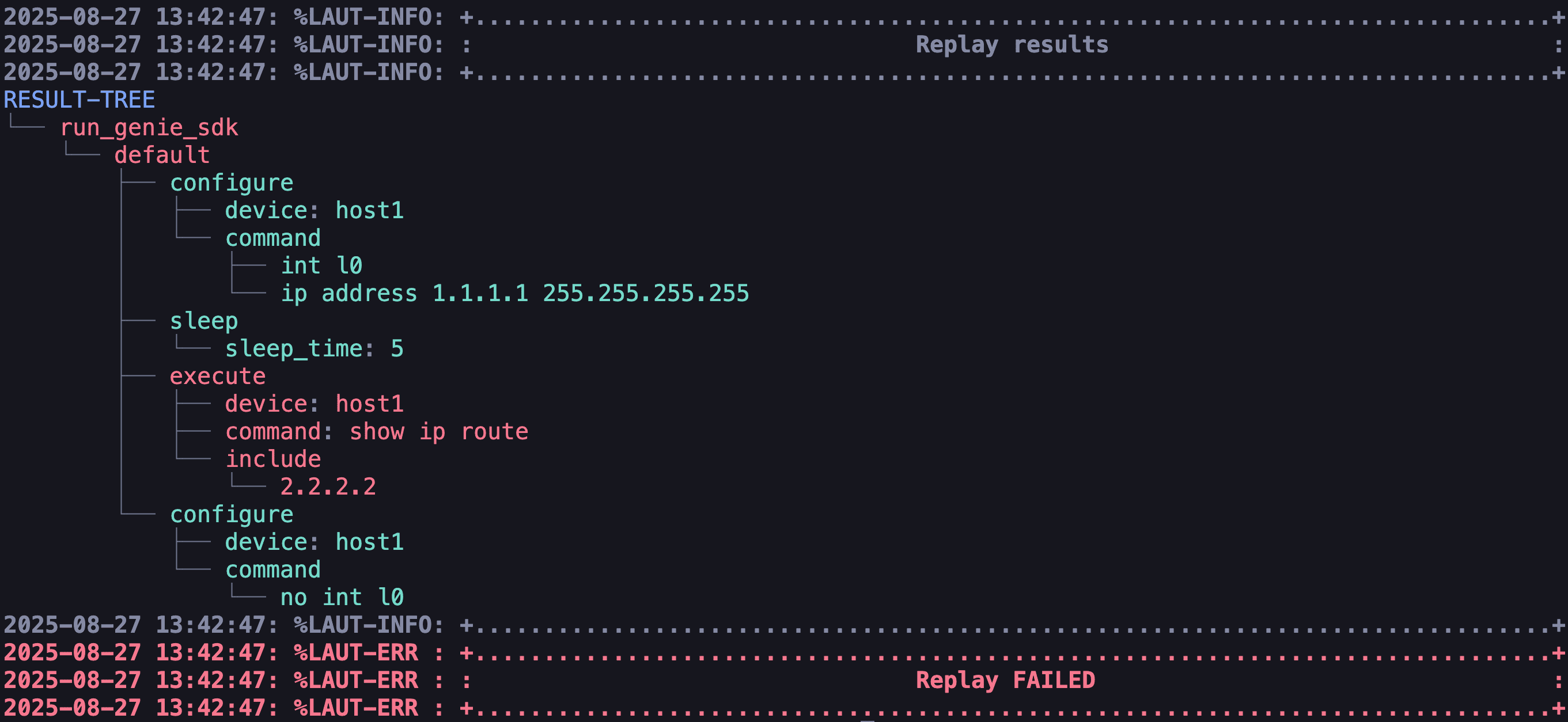
After execution, LAMP displays a tree-like structure showing all actions and their results. This visual representation makes it easy to understand what happened during the test execution.
Result visualization features:
Passed actions: Displayed in green text
Failed actions: Displayed in red text
Section folding: Successful sections are collapsed to focus attention on failures
The example below shows a test result with a failed ‘execute’ action: